spool: loom for agents
Drive your app once, get one link
Install the CLI, point it at your running app, and drive it once. Spool records a real browser, narrates it, and publishes one watch link.
Install the CLI
Step 1One npm line and a headless Chromium. spool login connects the machine to your account from the browser.
Drive your app once
Step 2spool live opens your app in a real browser. You drive it, or your coding agent drives it over the control server. Spool records one continuous video.
Narrate it and finish
Step 3Write the narration per step, or let the agent write it. spool finish voices it, renders it, and publishes the link.
npm i -g @spoolkit/cli
npx playwright install chromium
spool login
spool live spool/checkout --url http://localhost:3000
spool finish spool/checkout
The CLI is open source under the Functional Source License at github.com/aaarnv/spool. It installs from npm as @spoolkit/cli, and local renders run on your own OpenAI key.
It records the real thing
A real browser, not a slide show of screenshots. One continuous take, chaptered and captioned.
A real browser, or your whole screen
spool live records your app in a real browser. Add --target os and it records the macOS screen instead, so a terminal or a native app can be in the take.
Re-cut without recording again
spool recut moves, merges, splits and renames the steps from the signals of the take. The video is never opened or encoded again.
Captions that follow the voice
Every step becomes a chapter. The narration is timed to the word, so a caption lands on the word being spoken instead of guessing at it.
Change the backdrop after it renders
spool bg swaps the canvas behind the recording with no re-render, straight from the workdir. Pass --publish to put the new canvas online.
Render on your machine or ours
Local renders run on your own OpenAI key. Pass --cloud and the upload, the voice and the render happen on our machines instead.
Agents record their own
The spool skill teaches a coding agent the whole workflow. The MCP server gives it the tools, and spool mcp watch wakes it when your decision lands. See what agents can read.
The link lands on the pull request
spool publish --pr comments the watch link on the pull request. The GitHub App posts it and edits that same comment instead of adding another one, so a reviewer gets the walkthrough where they already are. The public GitHub Action runs the same thing in CI.
The second path, where nobody hits record
Install the GitHub App and every merged pull request becomes a narrated recap on its own. You record nothing.
Turn it on per repository
Pick the repositories worth watching, and leave the rest off. Each one is a separate switch in settings, and your CI does not change.
The recap comes back on the PR
The App comments the watch link on the pull request it came from, and edits that comment rather than adding another one.
Teach it your words
Give a repository an overview, a glossary and its areas. The recap writer reads them, so it names things the way your team does.
How a recap gets made
Five stages run on our machines, not yours.
The merge queues a job
Step 1The App sees the merge and queues one recap. The worker fetches the diff from GitHub.
A script comes from the diff
Step 2Four to six beats, 175 words at most. It opens on why the change happened.
Every beat gets a diagram
Step 3A lint checks each drawing. A draft that fails is drawn again.
The narration is voiced and timed
Step 4Each beat is spoken, then timed to the word, the same as a recorded take.
It renders and comes back
Step 5Vertical, 1080 by 1920 at 60 frames a second, then the link on the pull request.
A knowledge base your agents build and read
Every repository keeps its own context: an overview, its areas, a glossary, how to run it, and the decisions behind it. Agents author it and read it back, so the next guide or plan starts warm instead of cold.
One context per repository
An overview, the areas of the codebase, a glossary of your terms, the capture notes that say how to run the app, and the decisions that were made. It is stored per repository, not per spool.
Agents write the seed
spool init scaffolds the seed file and tells the agent what to fill in. The agent surveys the repository and authors it. spool init --apply sends it to the shared store.
Read back before the next guide
spool pr pulls the accumulated store into the workdir before anything is recorded. The guide starts with the run steps, the sign-in shape and the known traps already written down.
Answers stay grounded
The Ask box on a published guide answers from that pull request: its diff, the narration, the shipped code where a bundle exists, and the repository's own context. It says so when the answer is not there.
Agents coordinate through decisions
An agent proposes a plan and waits. spool gate refuses to start work without an approved one. A comment you leave blocks every call that moves the work forward until the agent acknowledges it.
Wake, do not poll
spool mcp watch holds the event cursor and long-polls for you. When a decision, a steer or an answer lands, it pokes the agent that is no longer running.
Everything you shipped, in the order it shipped
Walkthroughs you recorded and recaps you did not, in one place.
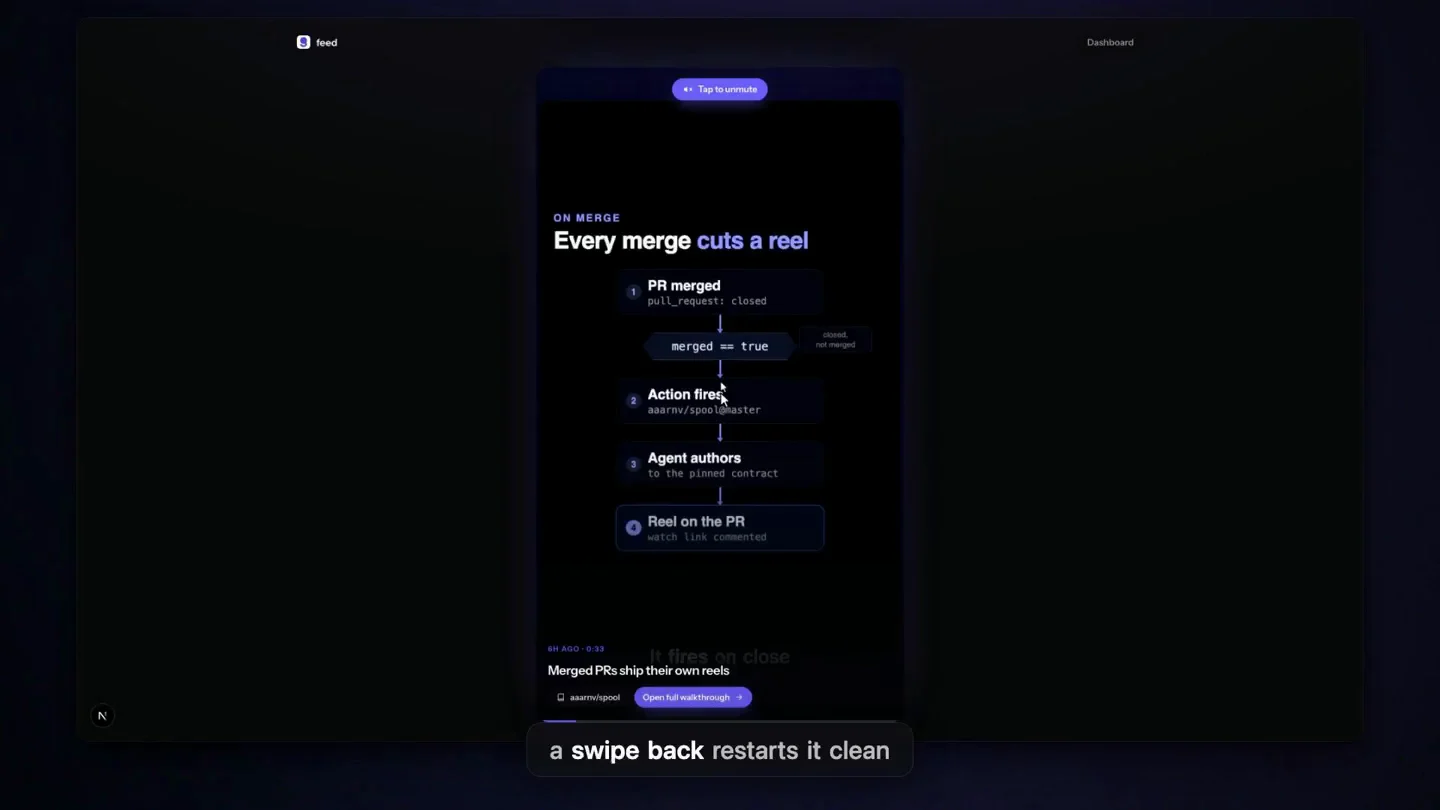
One swipe per change
The feed is a full screen pager. Swipe, or use j and k. Work waiting on your decision comes first, then everything that shipped.
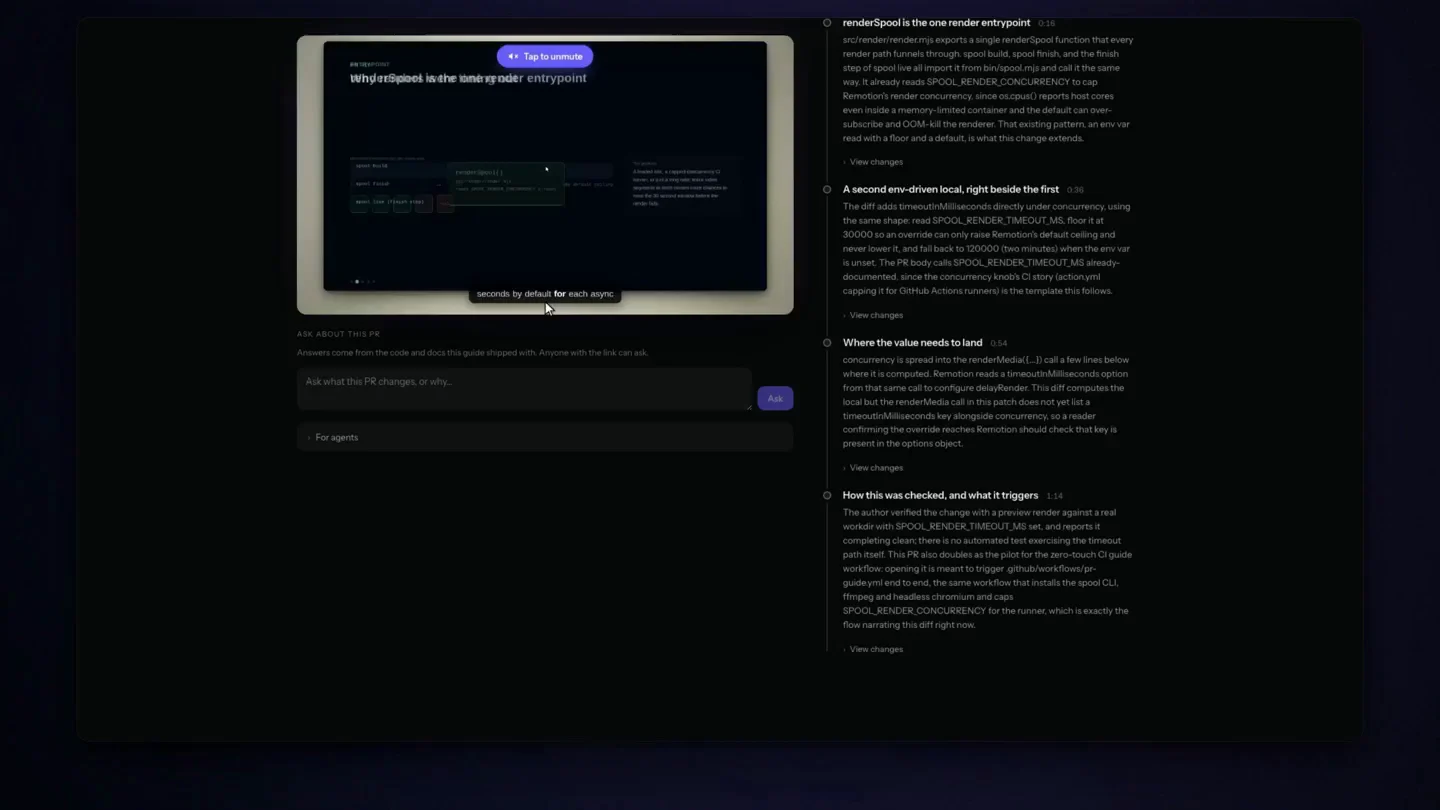
A watch page with chapters
Click a line of narration to move the video to it. A pull request guide shows the diff beside the stop that explains it. Copy one iframe tag to put the player in a document or a wiki.
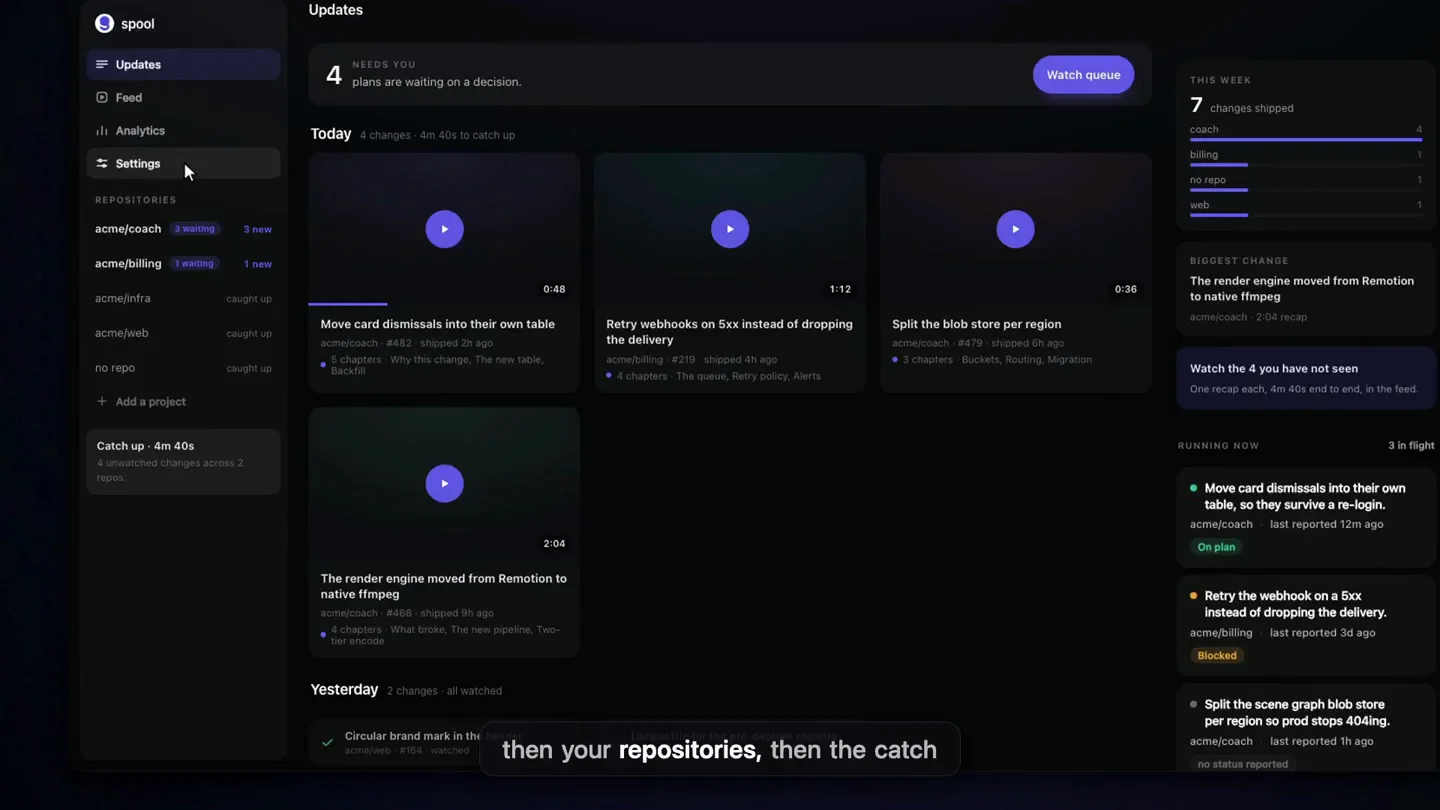
One dashboard for every repository
Changes grouped by day, what is still running, and how long it takes to catch up. Each repository has its own page for what changed since you last looked.
Ask a guide a question
Anyone with the link can ask about a published pull request guide. The answer comes from the code and the diff it shipped with.
Watch-through analytics
See how many people watched, how far they got, and how many reached the end. Per spool, per repository, over the last 14 days.
A digest in Slack
Send a daily or weekly list of what is new to a Slack channel. Preview it before you subscribe.
The archive doubles as onboarding
Walkthroughs and recaps do not expire. Six months in, the feed is the tour of the codebase nobody had time to write. Point a new hire at it and let them watch their way in.
Decide before the agent builds it
A plan spool is a recorded proposal. You watch it, you decide, and the agent cannot start until you have.
The agent records the plan
The goal, the approaches it weighed, the evidence behind each one, and the one it recommends. It runs about a minute.
You approve or send it back
Approve the recommended approach with one tap from the feed. A redirect, a park, or a reject needs a reason, and the agent reads it.
A question stops the work
Ask on the moment of the video you are watching. Until the agent acknowledges the question, every call that moves the work forward is refused.
The gate holds the line
spool gate blocks implementation until a plan is approved. Four policies, from advice only to always required. A bypass needs a reason and is written to the audit log.
A proof closes the loop
When the work is done the agent records a proof: every step of the approved approach, what it verified, and where it departed from the plan.
Two plans, nothing to run
Record and render on your own machine for nothing. Go Pro when you want our machines doing the work.
Free
Record and render locally on your own OpenAI key. Publish 3 a month, and those links stay live forever.
- Local renders on your own OpenAI key
- 3 published spools a month
- Every feature: chapters, captions, embeds
- Drafts and failed renders are free
Pro
Cloud renders and recaps on merge, for a team that ships every day. Nothing to run.
- 20 cloud renders per seat, pooled
- $1 per extra recap
- Recaps on every merged pull request
- Higher hosted voice and cloud-render limits